
Perfect Keyboard Pro1.5.0 - Get APK
You'll be able to download in few seconds.
Publisher Description
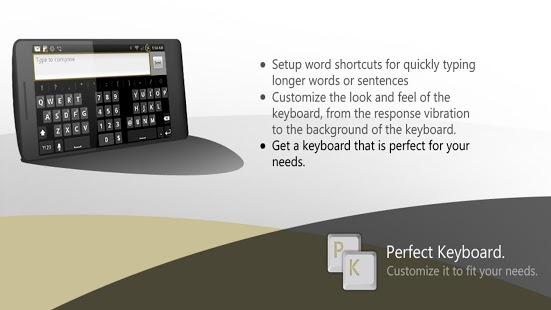
There are numerous keyboard replacements in the Android Market that aim at giving you the perfect typing experience, but a lot of them forget that only you know your perfect experience—that’s what perfect keyboard strives to achieve. Perfect keyboard offers you countless customizable settings for the look, feel, touch response, word suggestions, and just about everything you might need changed for your Perfect keyboard. If you like to have your phone’s keyboard vibrate when you type something, we have a setting for that. If you’d rather have a picture of your beautiful family as your keyboard’s background rather than a boring plain background, we have a setting for that. Give Perfect Keyboard a try, and after a few tweaks we are certain you’ll have your very own Perfect Keyboard.
Note: Perfect Keyboard works only on Android 2.2 and up
Detailed Specifications:
√ Multitouch keyboard
√ User dictionary, built-in dictionary, International dictionaries (separate downloads from the Market)
√ Configurable auto correction
√ Redesigned and optimized keyboard layout and style
√ 8 Keyboard themes ( gingerbread,iPhone keyboard,honeycomb,icecreamsandwich and more).
- Configurable colors for the keyboard buttons, background and text
√ Configurable color for the word suggestion font
√ Speech to text (select languages only)
√ Next word prediction
√ Custom vibration intensity (haptic feedback)
√ Long press "Enter" key to bring up smiley alternatives
√ Long press on "/" key in URL mode to bring up domains (you can configure the domains in the settings to better fit)
√ Configurable sound style and volume ( Samsung,iPhone,android)
√ Cursor Keys - swipe up on the space key to display.
√ T9/compact layout.
√ Gestures.
√ Shortcuts (auto-text like in blackberry)
√ External skins (some of better keyboard skins)
√ Alt symbols on the keyboard.
√ Split layout for tablets.
√ configure the layout of the keyboard (key height,row gap etc)
Tips:
#Change Appearance and Themes:
To change appearance go to settings -> appearance
#About "collecting data" warning message:
That warning message is a part of the Android operating system, and it appears whenever a third party keyboard is enabled. You don't have to worry because the keyboard don't have permission to internet access.
Please report your bugs via email . If you report bugs in a Market comment I CAN'T help you.
Supported languages layout: English(QWERTY,Dvorak,AZERTY), French (ASERTY,QWERTY,QWERTZ), Hebrew, Arabic, German, Czech(QWERTY,QWERTZ), Bulgarian, Catalan, Spanish, Esperanto, Danish, Italian, Finnish, Georgian, Russian, Ukrainian, Latvian, Swedish,Latin, Dutch, Portuguese, Slovakian, Slovenian, Greek, Rumanian, Serbian, Hungarian,Swiss,Polish.
reviews:
AndroidTapp:
Perfect Keyboard is an excellent keyboard replacement application.
TalkAndroid:
When it comes to customizations, nobody does it better than Perfect Keyboard.
About Perfect Keyboard Pro
The company that develops Perfect Keyboard Pro is My Perfect Apps. The latest version released by its developer is 1.5.0.
To install Perfect Keyboard Pro on your Android device, just click the green Continue To App button above to start the installation process. The app is listed on our website since 2012-12-20 and was downloaded 0 times. We have already checked if the download link is safe, however for your own protection we recommend that you scan the downloaded app with your antivirus. Your antivirus may detect the Perfect Keyboard Pro as malware as malware if the download link to inputmethod.latin.perfectkeyboard is broken.
How to install Perfect Keyboard Pro on your Android device:
- Click on the Continue To App button on our website. This will redirect you to Google Play.
- Once the Perfect Keyboard Pro is shown in the Google Play listing of your Android device, you can start its download and installation. Tap on the Install button located below the search bar and to the right of the app icon.
- A pop-up window with the permissions required by Perfect Keyboard Pro will be shown. Click on Accept to continue the process.
- Perfect Keyboard Pro will be downloaded onto your device, displaying a progress. Once the download completes, the installation will start and you'll get a notification after the installation is finished.
Program Details
System requirements
Download information
Pricing
Version History
version 1.5.0
posted on 2012-12-20
Bug fixes.,Alphabetic order in user dictionary.
version v1.0.8
posted on 2011-04-29
Several fixes and updates
Disclaimer
External Download
We do not host Perfect Keyboard Pro on our servers. We did not scan it for viruses, adware, spyware or other type of malware. This app is hosted by Galad and passed their terms and conditions to be listed there. We recommend caution when installing it.
The APK Download link for Perfect Keyboard Pro is provided to you by apps112.com without any warranties, representations or guarantees of any kind, so access it at your own risk.
If you have questions regarding this particular app contact the publisher directly. For questions about the functionalities of apps112.com contact us.
